2 Comments

Creating a Post-it Note Themed Brainstorming Space in Tinderbox

Sometimes when I’m using Tinderbox, I want the experience and aesthetics of working with Post-it notes on a large blank wall. This morning, as I was brainstorming some end-of-the-year OKRs, I figured out how to create such a space without the extra clicking that Prototypes or Stamps require. The above video takes you through the steps I took to assign OnAdd rules to a container where all notes created (or pasted) into it look Post-it-note-ish.

To make these notes, I typed ⌘1 for “Inspector”, clicked the “Gear” icon on far right, selected the “Action” tab, pasted the following code, and hit ↵: $Color = "cooler poppy"; $Width = 6; $Height = 6; $Shadow = true; $ShadowDistance = 10; $ShadowBl…

To make these notes, I typed ⌘1 for “Inspector”, clicked the “Gear” icon on far right, selected the “Action” tab, pasted the following code, and hit ↵: $Color = "cooler poppy"; $Width = 6; $Height = 6; $Shadow = true; $ShadowDistance = 10; $ShadowBlur = 20; $ShadowColor = "lightest black"; $NameAlignment = "center"; $NameFont = "SketchnoteSquare";

2 Comments

Noticing

2 Comments

Noticing

 
IMG_0584.jpeg
 

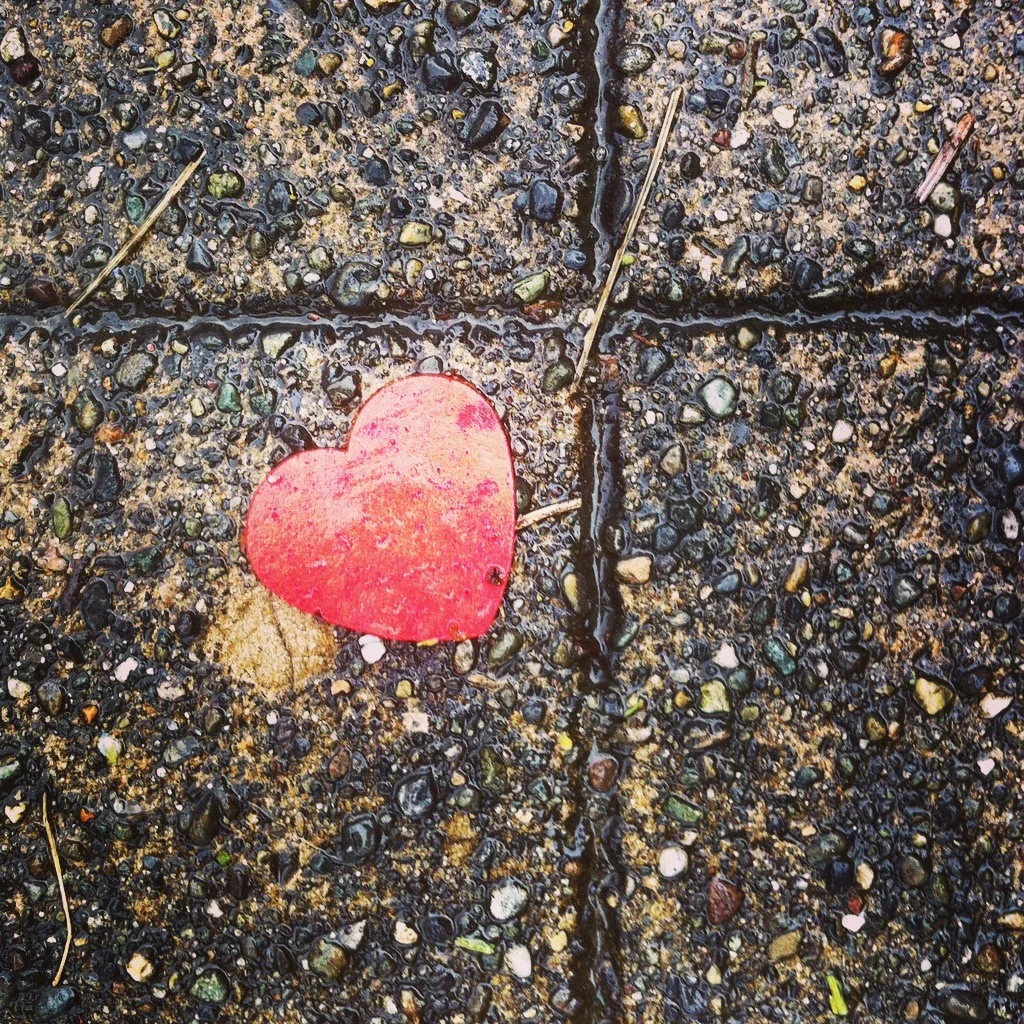
On rainy day in March 2015, I walked outside of my apartment in Capitol Hill and noticed the heart pictured above on the sidewalk. This wasn’t a terribly groundbreaking moment. Having worked for science museums, I’d been trying to slow down and notice the world around me for some time. But, for some reason, I decided to snap a photo of it and posted it to Instagram with a hashtag I made up on the spot, #seattleloves. I felt something positive in noticing that heart. I associated it with the idea that I belonged in Seattle, having only arrived a few days before. For several months after, I posted dozens of pictures of hearts. A patch of bare dirt, a cloud, a broken hazelnut shell, graffitti. I began to notice hearts everywhere.

hearts.jpg

I documented each photo dutifully with #seattleloves until my relationship with Instagram got “complicated” and I removed the app to regain some of my attention. By that point, though, the practice of noticing hearts was a habit. I continued to notice them, and still snapped photos occasionally. Four years passed. Noticing a heart had become an experience of orientation, like a signpost on a trail telling me I was on the right path.

Then, a few months ago, when I had some extra time and it was a lovely day, I decided to walk from the ferry terminal downtown to the university. I chose to walk over Capitol Hill and I found myself a few blocks away from where my practice began. I noticed a heart. This one:

 
IMG_1193.jpeg
 

At that moment, on that day, with that heart, I realized these hearts weren’t signposts so much as reminders that I everywhere I am is the right place.


A Contemplative Practice

When I tell people that I research contemplative practice, they more often than not reply, “What do you mean by contemplative practice?” Much of what I mean can be illustrated by this example of noticing hearts. But before I can speak to that, I should center us on at least one understanding of the word contemplation.

Contemplation is a moment of presence to life. It can have mundane and/or extraordinary consequences (extraordinarily joyful or painful) or someplace in between. It does not require practice, in fact, we all experience contemplation from time to time. As Mary Frohlich, a Religious of Sacred Heart and professor, describes it:

We can define contemplative experience as awareness—whether fleeting or habitual—of that most foundational, most original depth of being. … Because this is our most foundational reality, contemplative experience is potentially available to every human being, at all times and in every circumstance. It can and does “happen” to people without any preparation and while they are engaged in pursuits that are not concerned with seeking it.

In my noticing hearts example, contemplation occurred in the moment of truth I experienced when I noticed the green graffitied heart on the sidewalk. Contemplative practice, the four years worth of hearts I noticed prior to that moment, readied me for that moment. It also made that moment available to me because I was attuned to the act of noticing instead of being caught up in my thoughts of the future or past (which is almost certainly where I’d be otherwise).

The practice cultivated a purposeful curiosity—a habitual preoccupation with the mysterious unfolding of my own life—that resonated deep within me. The realization that “everywhere I am is the right place” changes my perspective and behavior (when I can remember it), and invites me to accept what life gives and to have compassion for myself and others when what life gives is particularly challenging. I’ve found (and still find) the practice to be delightfully rewarding, life giving, and of deep comfort.

I also realize the truths this practice holds for me are still unfolding. I do not know what I might take from noticing hearts in the years to come. That, too, I hold with curiosity and commitment.

Process Book No. 10 — Noticing (Individual).png

An Invitation to Practice

In the Design Methods class I’m teaching this fall, I will be inviting my students to establish their own noticing practice. This is, in part, to help them become better designers. But it’s also, in part, to invite them to explore the mysteries in their own life with a similar purposeful curiosity. After mentioning the assignment to a colleague, who then began to notice hearts herself, I decided to share this blog post and invite anyone to engage in the practice. Here is the Google Slides template if you would like to use that on your own, or in your classroom.

I should also say that don’t have to notice hearts, of course. Any shape, object, or concept that regularly hides in plain sight will do. For prior students hearts, circles, feathers, specific colors (or gradients of color), or concepts like pareidolia have worked well. My advice is to pick what resonates most for you, and adjust if you never see it, or it doesn’t delight you when you do.

2 Comments

4 Comments

Google Slides as a Pedagogical Tool

This summer, I found Google Slides a remarkably effective tool in the classroom and want to share a few of the ways I’m using it to support student work. Before I share these use cases, I’d like to thank and credit Ahmer Arif for the idea of using templated Google Slides documents as collaborative student assignments in the first place, and my advisor, David Levy, for his guidance and collaboration in prototyping templates for a different class. Thanks, Ahmer and David!

Use No. 1: Homework Assignment

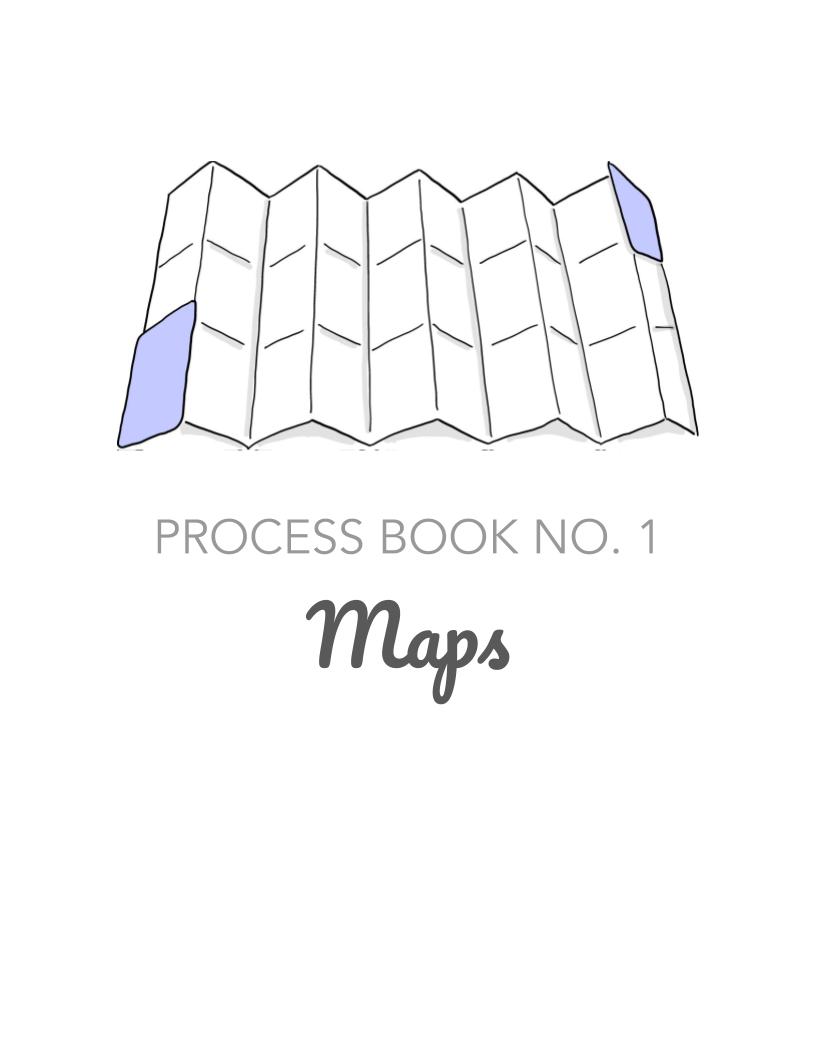
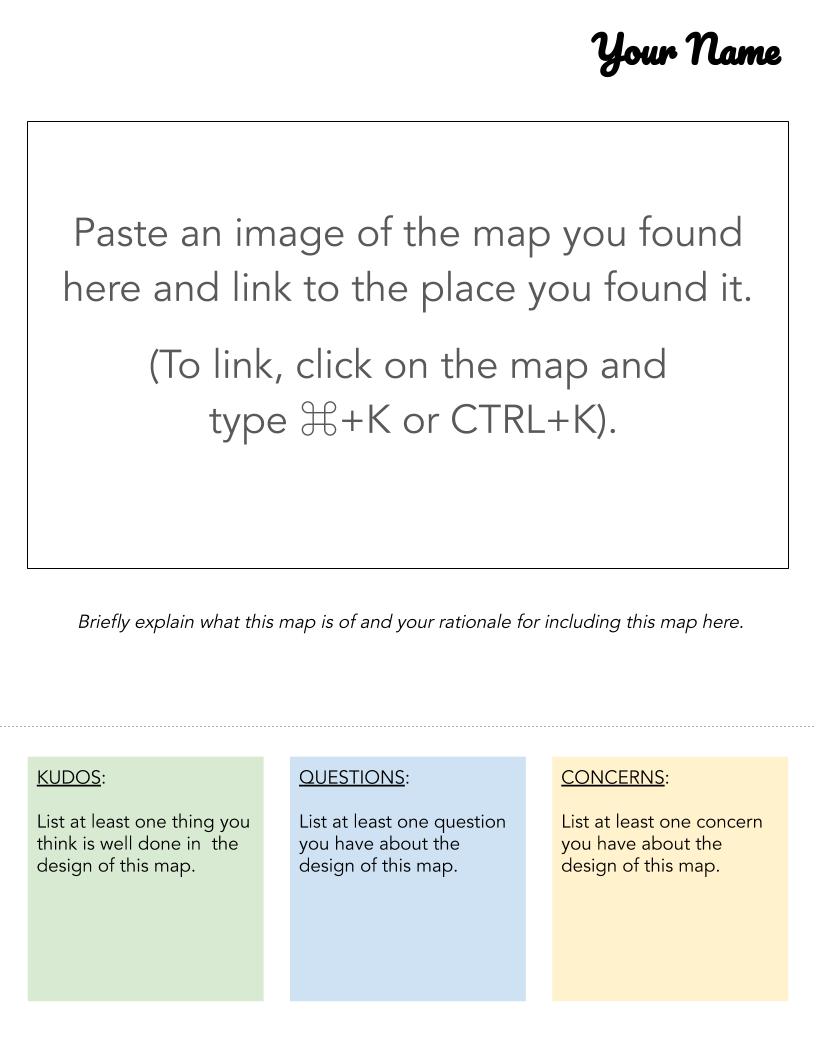
Copy of Process Book No. 1 — Maps.jpg
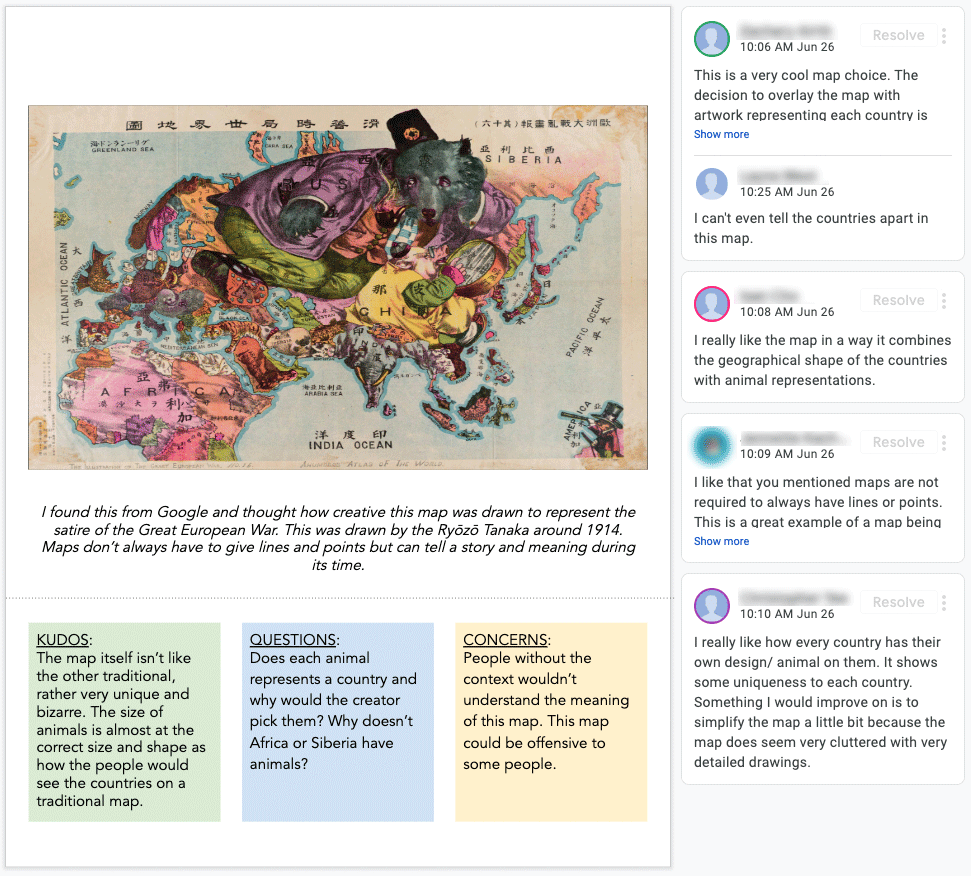
Copy of Process Book No. 1 — Maps (1).jpg
Copy of Process Book No. 1 — Maps (2).jpg

In the undergraduate design methods course I’m teaching, I have a series of assignments called “Process Books.” Each assignment is a Google Slides document resized to a standard 8.5x11 sheet of paper. The slide deck has a cover page, a template, and an example (as seen above). Students copy the template and fill it out in a single, shared Google Slides document. For our class, we were co-designing a map of restorative spaces on campus, so this assignment asked students to find examples of maps, give them context, and provide commentary—something they liked about it (in green), a question they had about it (in blue) and a concern (in yellow). When the assignment was done, we had over 40 example maps we could use to inform our collective project.

Screen-Shot-2019-09-09-at-3.10.59-PM.gif
1Screen-Shot-2019-09-09-at-3.10.59-PM.gif

Another example of an assignment like this was asking students to (1) find and share links to articles that supported or challenged the assumptions we were making about our research; and (2) find examples of technologies that already addressed our problem space. These articles and examples gave us rich and plentiful analogous research to consider as we brainstormed interventions.

Use No. 2: Peer Validation and Critique

Another way to use Google Slides in an assignment like the one listed above is to have students go to the document in class and provide peer feedback to each other through the commenting feature. In the case below, I gave students time in class to visit at least two slides and to (1) say something validating to the student about their work; and (2) to look at the slide through a critical lens and comment on specific things we may want to replicate or avoid in our own map. Each slide ended up with several comments and students got to exercise validating each other and also being critical about design.

 
feedback.gif
 

Use No. 3: VIRTUAL Dot Voting

In a different assignment, students grouped up in class and created visions of our university in 5-10 years. The visioning work was inspired by Zingerman’s Zingtrain Visioning exercises and students were asked to imagine our university as a less stressful, more restorative place. They used text, images, sketches, and video (all easy to create and embed on the fly in Google Slides) to create their slides. Then, the class reviewed the slides of other teams and each student was told to copy a blue dot I provided on the instructions slide and paste it three times to vote on different parts of the vision that most excited them (see below). In a matter of minutes, we could see certain ideas bubble to the top and discuss them as a class.

visions.gif

Use No. 4: Slide as Art Board

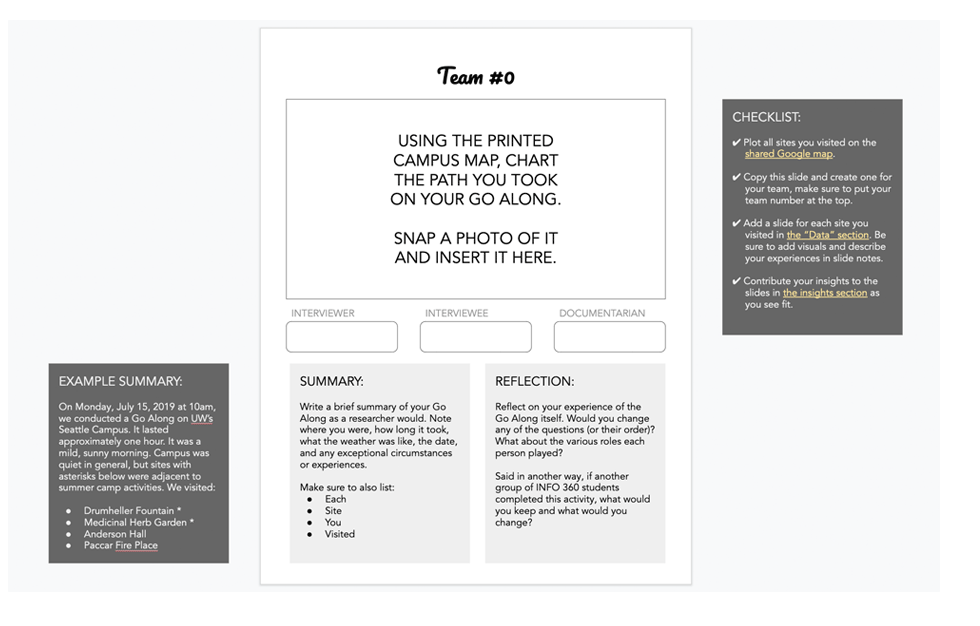
It is reasonable to think of a Google Slides document as a slide to be projected in a presentation. This use makes anything that is not on the slide itself irrelevant, like the notes and the gray space beyond the borders of the slide itself. But in our case, these are valuable regions of information and exploration. For example, I began to use the gray space surrounding the slide as a place for communication to the students: checklists, examples, hints, and reminders.

Untitled-61.gif
Untitled-6.gif

Use No. 5: Slide Notes for Reflections

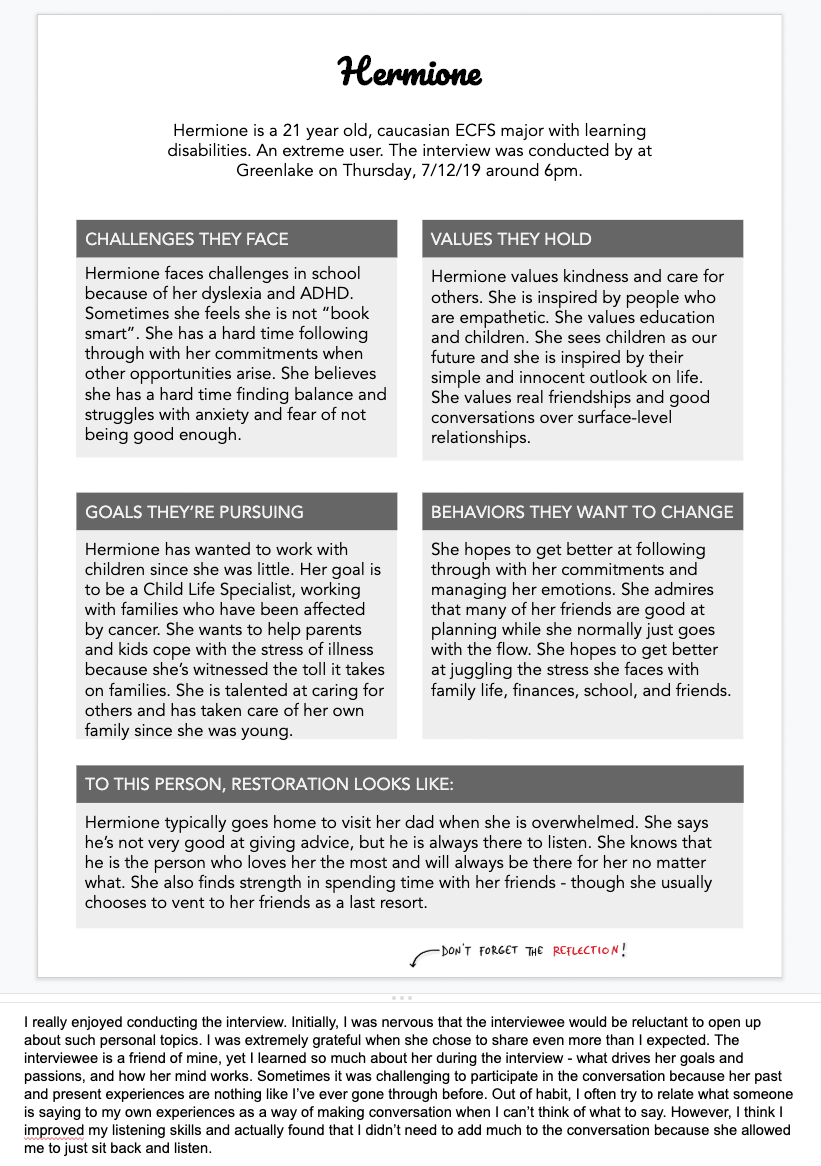
The slide notes area is a great space for instructions as well as a place to ask students to reflect on their learning. For example, in this empathy mapping assignment, which was inspired by OF/BY/FOR ALL’s Partner Power Meetings, the slide notes for the template slide were as follows:

Instructions: (1) Create a slide and enter the interviewee’s pseudonym and description. (2) List the challenges, values, goals, behaviors, and restoration as requested in each section. (3) Adjust the spacing and font size so that the final page looks considered and intentional. (4) Replace these instructions with a brief reflection (2-5 sentences) on what the experience of the interview and empathetic listening was like. What did you learn that you didn’t already know? What was challenging? Was there anything you felt you were particularly good at?

These reflections ended up being a great addition to the assignment and the students always seemed to have valuable things to share, as you’ll see the example below. This worked so well, I’ll likely incorporate this into all assignments moving forward.

 
reflection.gif
 

Use No. 6: Collaborative Slides

For all of the use cases mentioned so far, either a student or a group of students has worked on a slide together, but we also invited several students or groups of students to collectively contribute to a single slide. For example, when students did field observations of various restorative sites on campus, they categorized their sites across a variety of features, like the presence of trees or water, and they mapped them on matrices, like how loud or crowded a space was (as seen below). Some collaborative slides simply asked the students a question and they added their answer in a bulleted list (with a comment or a parenthetical team number to identify their work). As with many of the assignments, these slides became resources for the entire class to use.

Copy of Process Book No. 6 — Field Observations.jpg
Copy of Process Book No. 6 — Field Observations (1).jpg

Some last words…

When used these ways, I found Google Slides to be a tremendous asset to the classroom. Students could see each other’s work and also interact with each other. I found grading their slides enjoyable and it was easy to simply download a PDF of the file at the time the assignment was due. Since one of my policies is that any assignment can be revised and resubmitted, it was also easy for the student to continue to work on their slide and notify me for regrading. As I continue my use of Google Slides as a pedagogical tool, I will add new use cases and further describe what I learn. If you decide to experiment with it, please let me know how it works for you and the new ways you discover to use it!

download templates

In the time since this posting, some readers have requested access to the templates I use and so I have made copies available here:

4 Comments