Comment

Tag Team: Help and Be Helped via Zoom Breakout Rooms

I am a longtime fan of Liberating Structures and since the pandemic I’ve been working to adapt them to Zoom meetings. One adaptation that’s gone well is Troika Consulting, which I call “Tag Team.” This activity engages trios to help each other through a highly structured conversation. This conversation/structure focuses on a single individual and is repeated three times so that everyone helps and is helped.


Modifications

The original version of this activity uses a “consulting” metaphor, which I find dissonant in the formal and informal learning spaces that I facilitate, so I use different language. Also, in the in-person version, there’s a period of time where one participant turns their back on the group to listen, but not participate in the conversation. On Zoom, this effect is achieved by having the person turn their microphone and camera off. I also add a step before the groups are formed, so that individual participants can figure out what they want to present to others. Here’s how it works:


Step One: Gaining Clarity

Because the timing of Tag Team is so fast-paced, I feel it’s necessary to give folks time to think about their problem before jumping in. I generally do this in one of two ways: engaging in a series of quick conversations through speed thinking, or a 10-20 minute period of private freewriting. I usually decide the method based my instincts about the participants, how well they know each other, and how much they trust me.

Step Two: Explaining the Process

The Tag Team process is pretty technical, as far as these things go, and needs to be explained before participants are left on their own to do it.

I use the above graphic in a series of slides where each time I advance the slide another row is revealed (so at first, they only see “Decide,” then I click and they see “Share,” and so on.

I use the above graphic in a series of slides where each time I advance the slide another row is revealed (so at first, they only see “Decide,” then I click and they see “Share,” and so on.

First, I tell folks they’ll be put into breakout rooms in threes. Once they get in the room they’ll have one minute to decide who will go first. That person will share their problem, then the other two will ask clarifying questions, then the person who has the problem will turn their camera/microphone off while the other two discuss the problem. Last, the person will turn their camera/microphone back on and reflect on what they hear in an appreciative spirit (not a “I’ve already done that” or “That’ll never work” attitude). All this happens in the time span of 10-minutes, so it’s a quick-paced and very focused experience. The group switches to another person and they repeat the process until everyone has gone, for a total of 30-minutes.

Step Three: Breaking Out into Rooms

I create breakout rooms in random groups of three and give folks a link to this cheatsheet so they can remember the steps once they’re out of the main Zoom room. I open the rooms, wait a minute (while they arrive and decide who will go first), and then send the following fly-in announcements at the appropriate time intervals:

  • First person: share what you need help with and why. (2 minutes)

  • Other two: ask clarifying questions. (2 minutes)

  • First person: cam/mic off. Other two: discuss how you’d address the issue. (4 minutes)

  • First person: cam/mic on. Reflect on what you heard. (2 minutes)

  • Time to switch! Second person: share what you need help with and why. (2 minutes)

  • etc.

To keep the time, I use the app MultiTimer, which allows me to track where I am in the process and know when to send each announcement.

IMG_3101.PNG
IMG_3100.PNG

I also have all the announcements written out in bulleted list in the slide notes so that I can cut and paste each announcement as I go. Because I cut instead of copy, I know exactly where I am in the announcements. In the example below, you can see what it would look like if I’d already sent the first three announcements and was waiting for the timer to tell me when to send the next.

Screen Shot 2020-10-18 at 10.17.38 AM.png

Troubleshooting

This activity has been successful across many types of participant groups (students, professionals, members of the public), but it still has room for improvement.

First, it’s tricky if the groups do not evenly divide into threes. When I have co-host(s), I’ll assign them to a pair and ask that one of the pair goes twice (better to go twice than spend longer on the activity). When I don’t have co-hosts I’ll assign foursome(s) and ask one person in the group to take a pass.

Also, sometimes folks don’t quite get the rules or why they need to turn their camera off, etc. This may be helped by doing a brief demonstration of the conversation in front of everyone before they jump into breakout rooms (thanks to Nancy for this idea).

Additionally, the Zoom breakout room announcements are easy to miss and it may be better to close the rooms after 10 minutes, bring everyone back, and then open them back up, just so everyone gets their full time (thanks to Robin for this idea).

As I experiment with these alternatives, I’ll update this blog post with how my process evolves.

The Best Part

The best part of this activity is the warm smiles on the faces of people coming back into the main room when the 30-minutes are up. It seems to facilitate real connection in a virtual environment, and, based on reports from participants, is actually helping people. I definitely recommend it and invite you to share your experiences and modifications with me so I might learn from them as well!
Comment

5 Comments

The Comfort/Chaos Circle

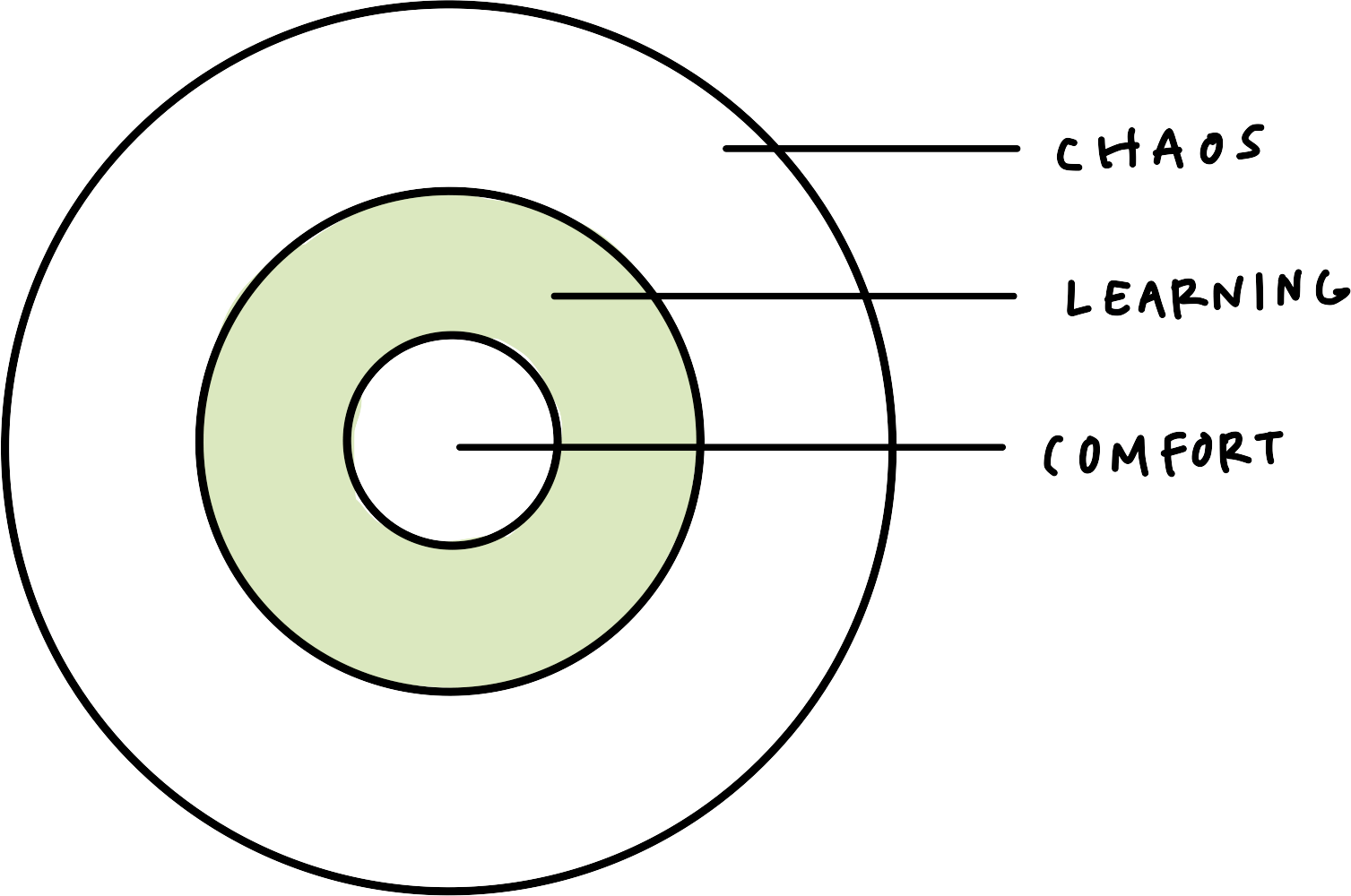
A couple years ago, I discovered a model for thinking about learning that I call the Comfort/Chaos Circle. I don’t recall where I picked it up, but it was immediately useful in my interactions with students and practitioners and I have used it in nearly every learning community I’ve fostered in the time since. The model is simply three concentric circles, each charting a specific zone: comfort zone, learning zone, chaos zone.

 
ccl.png
 

In general, I want learners to be in the green, the “learning” zone, but that’s not always the case. Comfort zones can be places to rest and recover, to build courage, to notice and reflect. Depending on our relationship with chaos, that zone can be uniquely productive as well. Our circles can and do shift across seasons of our lives, days of the week, and even moment to moment. Whatever’s going on in the world affects our relationship to comfort and chaos, as does our personality and our personal histories.

zones.png

I typically engage students in this model by asking them to draw their own Comfort/Chaos Circle. This is a great activity to get students to check with themselves and communicate where they are with me. It’s also fairly easy to draw and intuitive to do so.

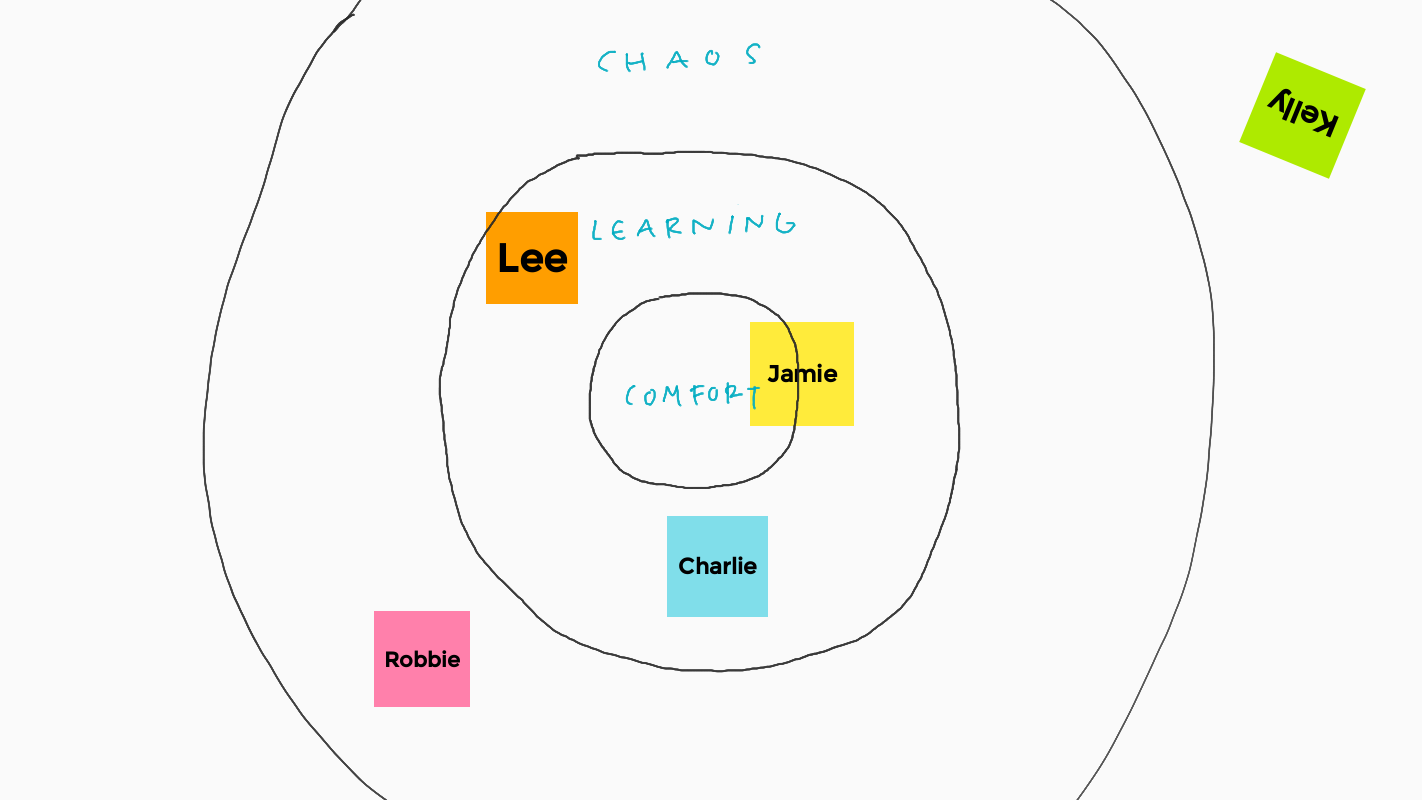
But given our recently imposed virtual learning environments, I have found a new way to use the Comfort/Chaos Circle and it’s working really well. I draw three circles on Jamboard (or any tool that allows collaborative editing, drawing, and stickies) with enough space for folks to put stickies in each zone. Then, I ask everyone to create a sticky, color it however they like, and plot where they are in that moment.

Default Board 3.png

In the span of a minute, I know so much more about where the group is: Jamie may need a nudge to stretch a little (or not, depends on how well I know Jamie). Lee has a toe in chaos, so I’ll need to keep an eye out for that. Robbie needs to be reeled in and Kelly is either putting a little levity in the exercise, doesn’t know how to use Jamboard, or needs a little one-on-one to see what’s going on.

In a large group, taking this sort of temperature check helps me re-assess my approach if there are a lot folks in comfort or learning. I like using Jamboard because it allows people to place their names on the line, which I’ve found is something people tend to do. (I’m sure other tools would do this as well, but it’s nice that the sticky goes “under” the line, so you can really gauge where they are.) Perhaps best of all, everyone in the group realizes where everyone else is and can contribute to the work of getting everyone nearer to the learning zone (including themselves).

I realize that online learning is creating a heap of work and considerable hurdles for many educators. This activity is a great way to get students using collaborative tools and paying attention to themselves and each other, one that’s actually a bit better online than in person. I hope it gives you insights into your students you wouldn’t have otherwise. And if you try it, please let me know how it goes, if it breaks, and/or how you’ve changed it to better meet your needs.

5 Comments

Comment

The Zen of Zooming

zoom.png

In 1973, Frederick Franck wrote The Zen of Seeing: Seeing/Drawing as meditation. It is a handwritten book that, as Franck cautions, “may be a little slower to read, but there is no hurry, for what I want to share with you took a long time to experience.” I discovered the book in 2012 as I was preparing for Project Feederwatch: Sketch, a 6-week collaboration with the Cornell Lab of Ornithology. Along with a phenomenal team of researchers, designers, and educators, I taught citizen scientists to draw the birds they were counting in their backyards.

The Feedersketch team in front of some of the drawings uploaded from our participants.

The Feedersketch team in front of some of the drawings uploaded from our participants.

The project is a highlight in my career and for many reasons—the team, the participants, the focus on birding and drawing—but a detail I must credit in part is how my preparation for the project took place on a trip to Paudash Lake with my two dear friends, Chris and Charlotte.

Paudash Lake, Ontario

Paudash Lake, Ontario

Chris’s grandfather won a small cabin, which sits on a tiny rock island in the middle of Paudash Lake, in a poker game long ago. Every summer, they go to the cabin for many weeks to restore and I was given the honor of being invited to spend time with them while they were there. It was such a lovely experience that I think of it regularly to this day and have in many the years since. While much of that loveliness has to do with Chris and Charlotte and our friendship, I do not hesitate to attribute some of it to the experience I had reading Franck’s book while I was there. 

Charlotte

Charlotte

Chris

Chris

To practice the Zen of Seeing, Franck asks you to sit and stare at an object intimately before beginning to draw it. Then, he asks you to draw it without looking away. That means you must draw without seeing what you’re drawing. The idea, in the long run, is that you transcend the self by truly seeing what you are drawing. Here’s how Franck describes the activity in his book (pp. XiV-XV). Notice how even the in-person version meets our present-day requirements to be socially distanced (!):


I distributed cheap sketchpads and pencils and transferred my workshop to the grounds of the college. I asked the participants to sit down somewhere on the lawn. “Anywhere, as long as you leave at least six feet of space between one another. Don’t talk, just sit and relax.

“Now, let your eyes fall on whatever happens to be in front of you. It may be a plant or a bush or a tree, or perhaps just some grass. Close your eyes for the next five minutes… 

“Now, open your eyes and focus on whatever you observed before — that plant or leaf or dandelion. Look it in the eye, until you feel it looking back at you. Feel that you are alone with it on Earth! That is the most important thing in the universe, that it contains all the riddles of life and death. It does!

You are no longer looking, you are SEEING.

“Now, take your pencil loosely in your hand, and while you keep your eyes focused allow the pencil to follow on the paper what the eye perceives. Feel as if with the point of your pencil you are caressing the contours, the whole circumference of that leaf, that sprig of grass. Just let your hand move! Don’t check what gets onto the paper, it does not matter at all! If your pencil runs off the paper, that’s fine too! You can always start again. Only don’t let your eye wander from what it is seeing, and don’t lift your pencil from your paper! And above all: don’t try too hard, don’t “think” about what you are drawing, just let the hand follow what the eye sees. Let it caress…”


With the limitations set forth by the pandemic, nearly all of our learning is happening virtually, and I am happy to say that the Zen of Seeing is an activity that not only transcends our spiritual realities, it also transcends the physical/virtual divide. I would even go so far as to say that the activity uniquely benefits from being online. Here’s how I do it.

Instructions

A recent Zen of Zooming sketch.

A recent Zen of Zooming sketch.

Step One: I ask everyone in the meeting to turn on their cameras and microphones so that we can see each other and share in a common soundscape. (I do make a disclaimer that those who don’t want to turn on videos or unmute for whatever reason are fine to remain unseen/unheard or some combination of the two.)

Step Two: I ask everyone to enter “gallery mode” so that videos of all participants are up at once. We scan the “room.” And then, like with Franck’s instruction, we allow our eyes fall on someone.

Step Three: We “pin” the video of the person we’re observing so it’s nice and big, and we sit in silence looking at them for about a minute.

Step Four: We start to draw. I give folks similar instruction as to Franck: “Don’t look down, start over if you want or need to.” I don’t use the word “caress” but I do say something like, “let your pen or pencil etch the contours of what you see onto the page.” We draw for about two or three minutes.

Step Five: I tell folks to stop drawing and ask everyone to look down to see what they did. There is always laughter, especially from those who have attempted to draw teeth. 

Step Six: I ask if anyone wants to share their drawing and inevitably a few brave souls will offer their page to the camera. We all pin the video while they describe their experience. 

Those dreaded teeth (that’s supposed to be me by the way).

Those dreaded teeth (that’s supposed to be me by the way).

The only people I’ve ever drawn like this, outside of a Zoom call (and even once on one), were of people that I know intimately and love. For the typical professional conference, classroom, or virtual training it would seem, perhaps, too much to expect that our participants open to each other enough to sit and stare and draw each other this way. But the Zoom interface miraculously shoulders the awkwardness of this activity. You can’t know who’s looking at you and whoever you’re looking can’t know it, either. No one can see what you’ve drawn unless you offer it up. The whole experience is publicly private.

I hesitate to imagine what Franck would think of this interpretation of his activity. I am sure he’d shame us into getting off our screens and into a meadow. But I'm also sure I would defend this in his presence because, in my experience, it is humanizing and intimate and real—all things our Zoom calls could use a lot more of.

Comment